
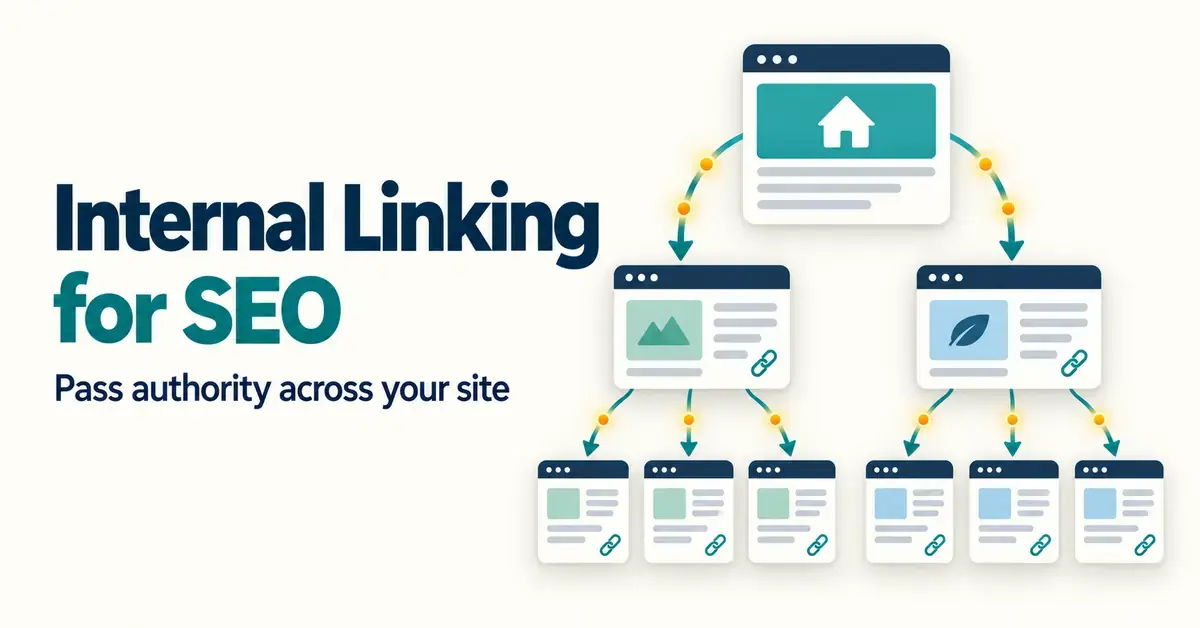
Internal linking for SEO is the practice of connecting the pages of your own website to each other with clickable links. Done well, it helps search engines discover your pages, understand how those pages relate, and work out which ones matter most — while guiding readers to the next useful thing to read. This guide explains how internal links pass authority (often called “link equity” or PageRank) across a site, how to build a simple internal linking strategy around topic clusters, how to audit what you already have, and the common mistakes that quietly hold rankings back.
Key Takeaways
- What it is: internal linking connects pages on the same website so search engines and readers can move between them.
- Three jobs: it helps Google discover pages, passes ranking authority (PageRank) between them, and uses anchor text to signal topic.
- Authority flows along links: route link equity from strong pages (often the homepage) to the pages you want to rank.
- Keep key pages shallow: around 94% of top-ranking pages sit within three clicks of the homepage.
- Avoid orphan pages: every page you care about should be linked from at least one other page.
- Anchor text matters: be descriptive and varied; never stuff the same exact-match keyword.
What is internal linking?
An internal link is a hyperlink that points from one page on a website to another page on the same website. The menu link to your “Services” page, a link inside a blog post that sends readers to a related guide, and a “read next” box at the bottom of an article are all internal links.
It helps to separate three link types early, because people mix them up:
- Internal links — from one of your pages to another of your pages (you control these completely).
- Outbound (external) links — from your page to a different website.
- Backlinks (inbound links) — from another website to yours. If you are new to the wider topic, our beginner guide to what backlinks are covers inbound links in plain English.
One technical point underpins everything below: Google can only follow a link if it is a standard HTML anchor element with an href attribute — for example, a normal text link. According to Google’s link best practices, links built only with JavaScript click handlers or non-anchor elements often will not be crawled. If you want a link to count, make it a real <a href> link.
Why internal linking matters for SEO
Internal linking is one of the highest-leverage on-page tactics available, because you control it entirely and it does three jobs at once. Google’s John Mueller has called internal linking “super critical for SEO” and “one of the biggest things you can do on a website” to tell Google and visitors which pages you consider important. Those three jobs are discovery, authority, and context.
1. It helps search engines discover and crawl your pages
Search engines find new pages largely by following links from pages they already know. If a page has no internal links pointing to it, crawlers may never reach it. Google’s own guidance is blunt on this point: every page you care about should have a link from at least one other page on your site. A page with no internal links pointing to it is called an orphan page, and orphan pages are routinely missed or ignored.
2. It passes authority to your most important pages
When one page links to another, it passes along a share of ranking signal — historically modelled as PageRank and often described informally as “link equity” or “link juice.” Generally speaking, the more (quality) internal links a page receives, the more authority it accumulates. Internal links let you deliberately route that authority from your strongest pages (often the homepage) toward the pages you most want to rank.
3. It gives pages context through anchor text
The visible, clickable words in a link — the anchor text — tell both readers and search engines what the destination page is about. Linking to a page about return policies with the anchor “our return policy” reinforces that topic far better than “click here.” This is the on-site cousin of anchor text optimization for inbound links, except that with internal links you write every anchor yourself.
How link authority (PageRank) flows across your site
Think of each page as a cup of water and each link as a pipe. A page’s authority is shared among the pages it links out to, so the pipes you build decide where that authority pools. Your homepage usually holds the most authority because it tends to attract the most external backlinks and sits at the top of your navigation, so links from the homepage (and other strong pages) carry real weight.
Two structural ideas matter here:
- Click depth. This is how many clicks it takes to reach a page from the homepage. The deeper a page is buried, the less authority tends to reach it and the less often it gets crawled. Ahrefs’ research found that around 94% of top-ranking pages sit within three clicks of the homepage.
- Flat vs. deep architecture. A flat structure keeps important pages close to the homepage, so authority and crawlers reach them in few hops. A deep structure buries pages under many subfolders and menus. For SEO, flatter is usually better for the pages you care about.
This is why internal linking is a strategic act, not decoration: by choosing which pages link to which, you decide where authority flows. For a wider view of how this fits alongside off-site work, see our overview of link building strategies and why link building matters in the first place.
Internal links vs. external backlinks
Internal links and external backlinks both influence rankings, but they work differently and you control them differently. Internal links are fully in your hands — you choose every target and every anchor — whereas backlinks must be earned from other sites. The table below sums up the differences. If you want the full picture of the many link varieties, our guide to types of backlinks goes deeper.
Internal Links vs. External Links
| Aspect | Internal links | External backlinks |
|---|---|---|
| Direction | From one page to another on the same site | From a different website to yours |
| Who controls them | You, completely | Other site owners — must be earned |
| Main SEO job | Discovery, site structure, routing authority | Third-party trust and authority signals |
| Anchor text | You write every anchor | Usually decided by the linking site |
| Typical weight per link | Smaller, but fully under your control | Often larger when from a relevant, trusted site |
| Main risk | Vague anchors, orphan pages, broken links | Spammy or paid links that breach guidelines |
How to build an internal linking strategy
A good internal linking strategy is deliberate, not accidental. The goal is to connect related pages, funnel authority to your priority pages, and leave no important page orphaned. Here is a practical, step-by-step approach.
Group your content into topic clusters
Organise related pages into clusters around a central “pillar” page that covers a broad topic, with supporting pages that cover sub-topics in detail. Each supporting page links up to the pillar, and the pillar links down to the supporting pages. This hub-and-spoke pattern signals topical depth and keeps related pages tightly interlinked.
Identify your priority pages
Decide which pages you most want to rank — usually service pages, key product pages, or flagship guides. These are the pages that should receive the most internal links from relevant, high-authority pages elsewhere on the site.
Link from strong pages to priority pages
Find the pages that already attract the most backlinks or traffic and add contextual links from them to your priority pages. This is the most direct way to route existing authority toward the pages that need a boost.
Write descriptive, varied anchor text
Make anchor text describe the destination so a reader knows what they will land on before clicking. Keep it reasonably short, and vary the wording across different links that point to the same page rather than repeating one exact-match keyword every time. Google treats anchor text stuffed with identical exact-match keywords as a spam signal.
Keep important pages within a few clicks
Aim to make every important page reachable within about three clicks of the homepage. Use your main navigation, category pages, and in-content links to shorten the path to the pages that matter.
Fix orphan pages
Make a list of pages that have no internal links pointing to them and add at least one contextual link from a relevant page. Every page you want indexed should be reachable through a link.
Common internal linking mistakes to avoid
Most internal linking problems are quiet — nothing breaks, pages just underperform. Watch for these:
- Vague anchor text. “Click here” and “read more” tell search engines nothing about the destination. Describe the target instead.
- Exact-match keyword stuffing. Using the identical keyword-rich anchor for every internal link looks manipulative and can be treated as spam.
- Orphan pages. Pages with no internal links pointing to them are hard to discover and rarely rank.
- Burying key pages too deep. If a priority page takes five or six clicks to reach, it will receive little authority and less crawling.
- Linking everything to the homepage. The homepage rarely needs the help; push authority to the deeper pages you actually want to rank.
- Using nofollow to “sculpt” PageRank internally. This no longer works. When Matt Cutts confirmed Google’s change back in 2009, he explained that the PageRank of a nofollowed link simply evaporates rather than flowing to the other links on the page. Let normal internal links stay normal.
- Redirect chains. Linking through a chain of redirects wastes crawl efficiency; Google lists redirect chains as something that negatively affects crawling. Point internal links straight at the final URL.
- Irrelevant links. Linking unrelated pages just to add links confuses context and annoys readers. Relevance first.
How to audit your internal links
An internal link audit finds orphan pages, weak spots, and broken links so you can fix them. A simple recurring process:
- Crawl your site with a crawler (for example Screaming Frog, Sitebulb, Ahrefs, or Semrush) to list every page and the internal links pointing to it.
- Spot orphan and shallow pages — pages with zero or very few internal links, or that sit too many clicks from the homepage — and add relevant contextual links.
- Check the “Links” report in Google Search Console, which shows your most-linked internal pages and your top internal anchor text, so you can see whether authority is pointing where you intend.
- Fix broken internal links and redirect chains by updating them to point at the correct, final URL.
- Review anchor text for descriptiveness and variety.
Internal linking is not a one-off task — every time you publish a new page, link to it from existing relevant pages and link out from it to related content.
Does internal linking help small sites?
Yes — internal linking helps sites of every size, even though “crawl budget” is not something most small sites need to worry about. Google’s Gary Illyes has said that sites with fewer than roughly a million URLs generally do not need to think about crawl budget, and owners of sites with only a few thousand URLs have little to worry about. In other words, for a typical business site, internal linking is not mainly about forcing Google to crawl more.
Its value on a small site is about authority and clarity: routing link equity to your priority pages, establishing topical relationships, and helping both readers and search engines understand which pages matter. Those benefits apply whether you have 20 pages or 20,000.
Sources
Frequently Asked Questions (FAQ)
What is internal linking in SEO?
Internal linking is the practice of linking from one page on your website to another page on the same website. It helps search engines discover and crawl your pages, distributes ranking authority between them, and uses anchor text to signal what each linked page is about.
Do internal links pass authority like backlinks?
Yes. Internal links pass a share of a page’s ranking signal (PageRank) to the pages they link to, so you can route authority from strong pages toward the pages you most want to rank. The effect per link is usually smaller than a quality external backlink, but you control internal links completely.
How many internal links should a page have?
There is no fixed number. Add as many links as are genuinely helpful and relevant to the reader, and no more. Prioritise linking to related, important pages with descriptive anchor text rather than hitting a target count.
Should I use nofollow on internal links?
No, not for “sculpting” authority. Google stopped letting nofollow redirect PageRank to other links in 2009 — the nofollowed link’s share simply disappears. Keep ordinary internal links as standard, followed links.
What anchor text should I use for internal links?
Use concise, descriptive anchor text that tells the reader what the destination page is about, and vary the wording across links that point to the same page. Avoid generic phrases like “click here” and avoid repeating the exact same keyword-rich anchor everywhere.
